Securing Docker Ports with firewalld
Docker manages its own iptables rules and, by default, exposes published ports to the whole world - firewalld’s zone rules don’t help here, because Docker inserts its own ACCEPT rule ahead of everything else. On top of that, Docker creates a chain called DOCKER-USER specifically so you can hook into it, but if firewalld gets restarted while Docker is running, that chain gets wiped and container access breaks. Here’s how I lock Docker’s exposed ports down to specific IPs using firewalld’s direct rules, on a CentOS7 box running Docker CE.
Why this is needed #
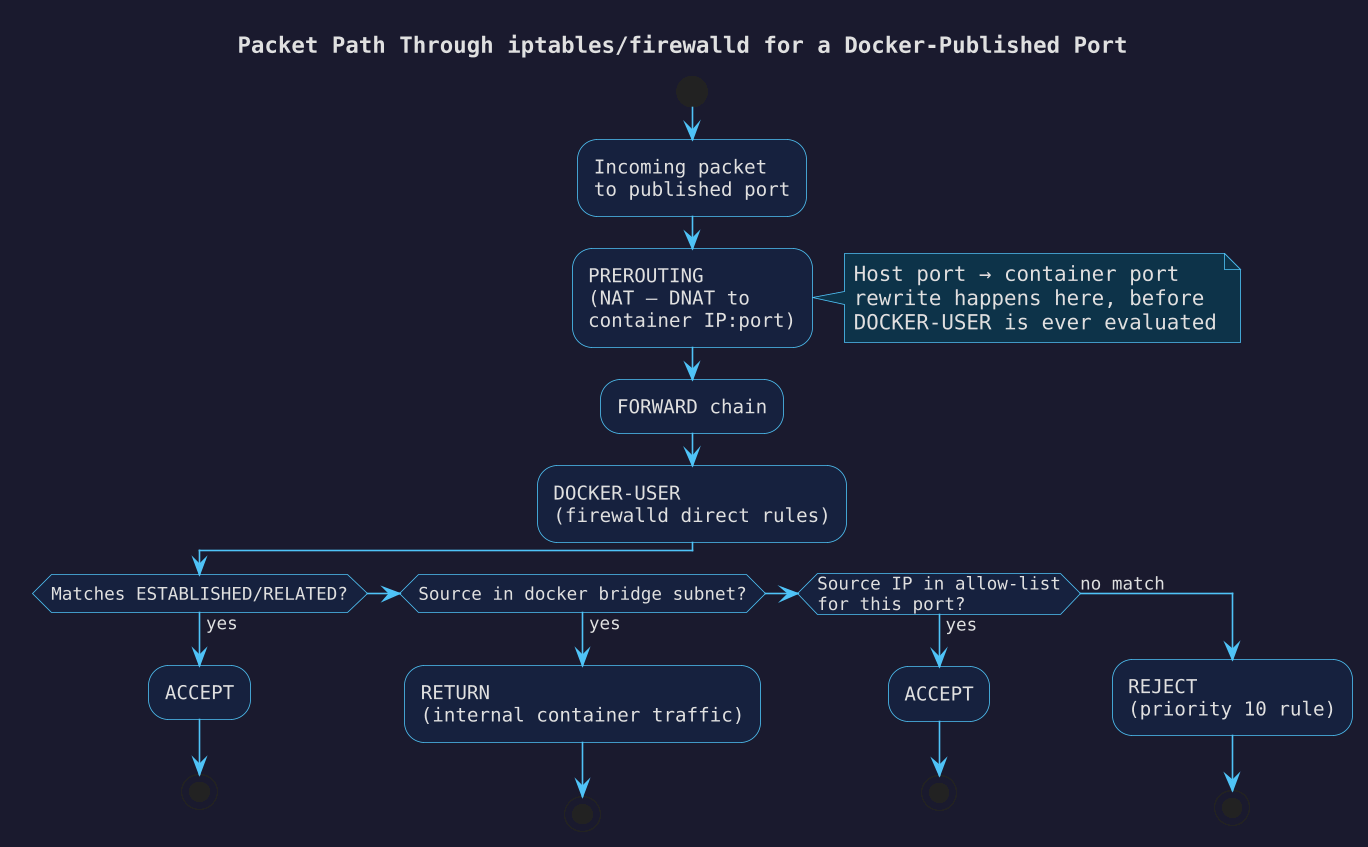
DOCKER-USER is evaluated before Docker’s own permissive rules, so anything you put there takes priority - but only if it’s not empty and nothing wiped it in the meantime. The plan:
- Stop Docker so it doesn’t fight with firewalld while we rebuild the chain.
- Recreate
DOCKER-USERcleanly. - Add an ACCEPT rule for established/related connections, so outbound traffic keeps working.
- Allow internal container-to-container traffic on the Docker bridge subnet.
- Allow specific source IPs to reach specific ports.
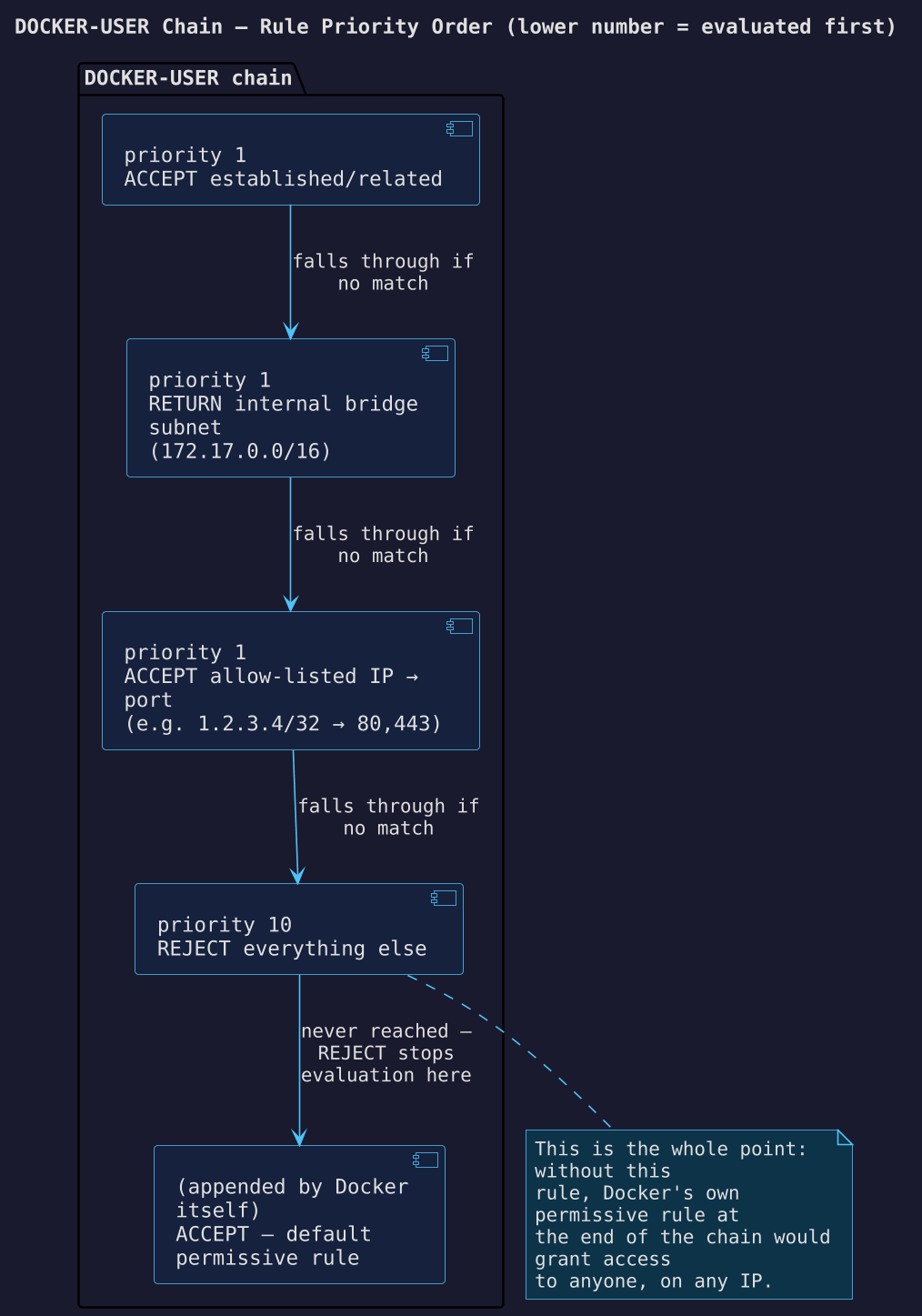
- Reject everything else, at the lowest priority, so it runs after all the allow rules but still before Docker’s own default rule at the end of the chain.
Recreate the chain #
systemctl stop docker

firewall-cmd --permanent --direct --remove-chain ipv4 filter DOCKER-USER
firewall-cmd --permanent --direct --remove-rules ipv4 filter DOCKER-USER
firewall-cmd --permanent --direct --add-chain ipv4 filter DOCKER-USER
Allow established connections and internal traffic #
firewall-cmd --permanent --direct --add-rule ipv4 filter DOCKER-USER 1 \
  -m conntrack --ctstate RELATED,ESTABLISHED -j ACCEPT \
  -m comment --comment 'allow containers to connect to the outside world'

firewall-cmd --permanent --direct --add-rule ipv4 filter DOCKER-USER 1 \
  -j RETURN -s 172.17.0.0/16 \
  -m comment --comment 'allow internal docker communication'
Check docker network inspect bridge first if you’re not sure which subnet your bridge network actually uses - it’s not always 172.17.0.0/16.
Allow specific IPs to specific ports #
firewall-cmd --permanent --direct --add-rule ipv4 filter DOCKER-USER 1 \
  -o docker0 -p tcp -m multiport --dports 80,443 \
  -s 1.2.3.4/32 -j ACCEPT \
  -m comment --comment 'allow 1.2.3.4 to reach http/https'
Repeat this rule per IP you want to whitelist. Everything not explicitly matched here falls through to the reject rule below.
Reject everything else #
This needs the lowest priority so it’s evaluated last among our own rules, but still before Docker appends its default ACCEPT-ALL rule:
firewall-cmd --permanent --direct --add-rule ipv4 filter DOCKER-USER 10 \
  -j REJECT -m comment --comment 'reject all other traffic to DOCKER-USER'
Apply and restart #
firewall-cmd --reload
systemctl start docker
Priorities in /etc/firewalld/direct.xml are just integers - lower numbers run first. Docker always appends its own rule at the very end of the chain, so as long as your reject rule has a lower priority number than “the end”, it wins.
Caveats #
- Port mapping. If you’re mapping a host port to a different container port (e.g. host
8443→ container443), match on the container port in yourDOCKER-USERrules, not the host-facing one - NAT in theDOCKERchain happens beforeDOCKER-USERis evaluated, so by the time your rule sees the packet it’s already been rewritten to the container’s port. - Debugging. Temporarily add a logging rule at priority 0 to see what’s actually hitting the chain:
Remove it with
firewall-cmd --direct --add-rule ipv4 filter DOCKER-USER 0 \ -j LOG --log-prefix 'DOCKER TCP: 'firewall-cmd --reloadonce you’re done. - Starting over. If the rules get into a bad state, stop firewalld, delete
/etc/firewalld/direct.xml, then start firewalld again - but make sure Docker is stopped first, otherwise it’ll recreate its own default chain before firewalld gets a chance to. - Rules added with
--permanentdon’t take effect untilfirewall-cmd --reload(or a firewalld restart) - don’t forget that step, or you’ll be debugging rules that “aren’t working” when they’re just not loaded yet.
Source / further reading: Securing Docker Ports with Firewalld